Residents · Managers · Technicians

Your whole building, in one app

Building365 replaces the notice board, the WhatsApp group and the pile of paperwork. Report a fault, watch a technician pick it up, read what is happening in the building, and see what you owe — from one screen everyone shares.
Fault reportingBuilding updatesFees & paymentsTechnician dispatch
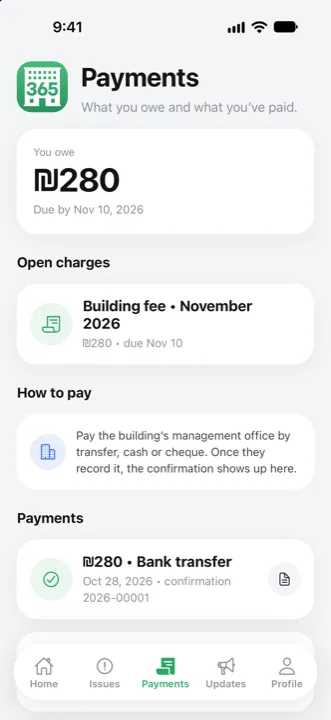
Building fees and payment history
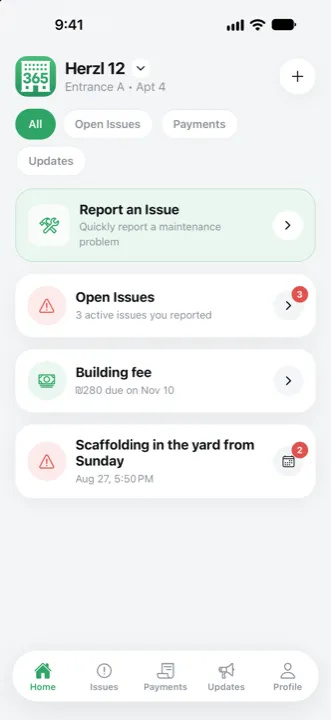
The building home screen
Fault resolvedLobby light · 2 days

Everything a building actually needs

Not a property-management suite. The handful of things residents, managers and technicians do every week, done properly.

Report a fault in seconds

Pick a category, describe it — by typing or by talking — add a photo or a short video, and it lands with your building manager.

Follow it to resolved

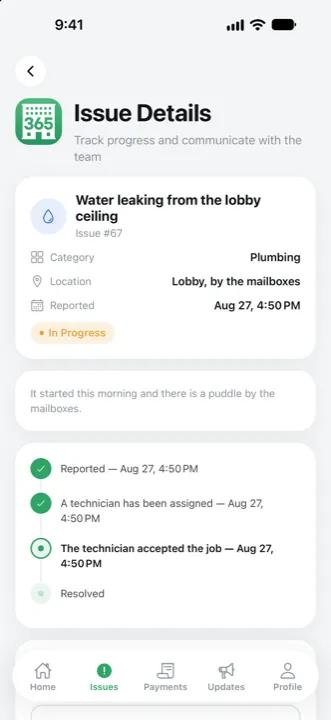
Every fault keeps a timeline: reported, assigned, accepted, in progress, resolved. Everyone sees the same status at the same time.

Updates that land

Water shutdowns, elevator inspections, stairwell painting — announcements reach every resident and stay there to be re-read.

Fees, dues and confirmations

See what is due and how to pay it, and get a numbered payment confirmation for every payment your management office records.

The right technician, dispatched

Managers assign by trade and schedule a visit. The technician accepts, reschedules or puts the job on hold — and everyone is told.

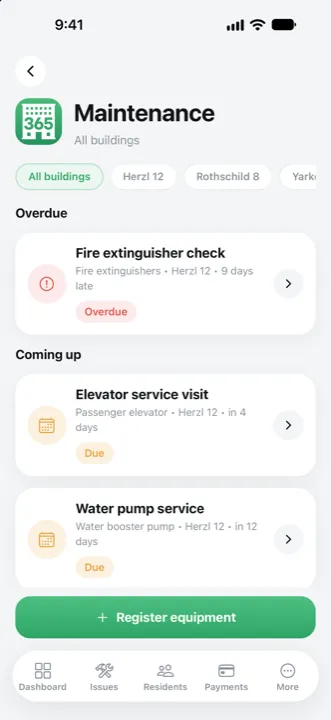
Maintenance before it breaks

Extinguisher checks, elevator inspections, pump servicing — each on its real interval, flagged while there is still time.
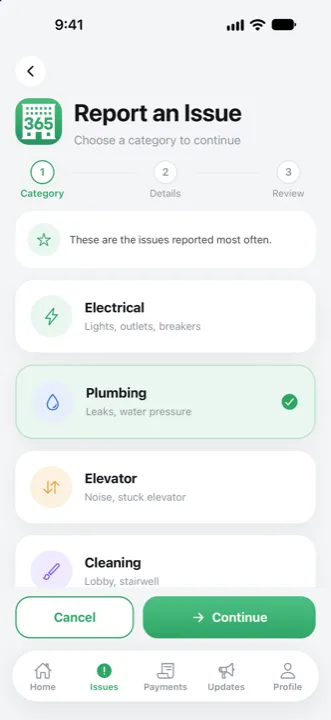
Choosing a fault category
A fault with its status timeline
Report & track

From “the lift is stuck again” to fixed

A short guided report — category, description, photo, urgency — and the fault is on your manager’s board. You get the timeline; they get everything they need to act.
  • Photos and videoShow the leak instead of describing it. Attach a picture or a short clip straight from the report screen.
  • Talk instead of typingDictate the description in whichever language you speak — separate from the language the app is in.
  • Urgency that means somethingFlag it urgent or a safety hazard and it sorts to the top of the manager’s board, not into a backlog.
  • A shared timelineComments and status changes are recorded, so nobody has to ask “any news?”
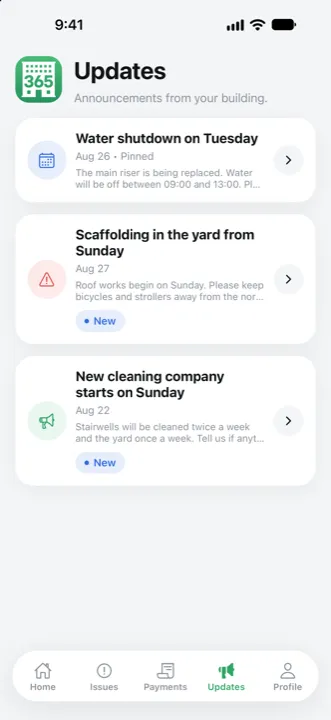
The building updates feed
Building updates

Know what is happening, without another group chat

Announcements from your building committee land in one feed instead of three group chats — read once, marked read, and still there when you need to check the date.
  • One feed for the buildingWater shutdowns, maintenance windows, meeting notices — read once, marked read.
  • Urgent stands outA water shutdown reads differently from a notice about the stairwell — and pushes.
A resident’s fees: what is due, how to pay, and past payments
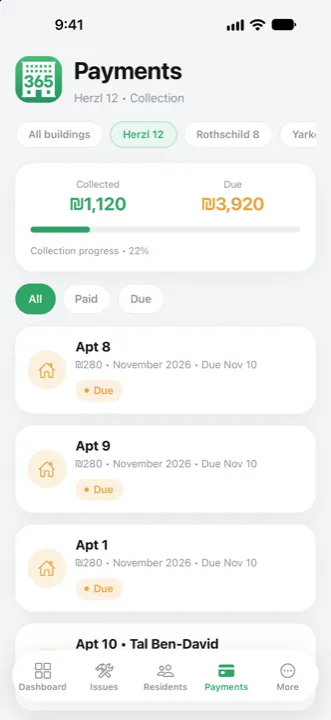
The office’s collection view: collected, still due, and each apartment
Building fees

Building fees, without the spreadsheet

The monthly charge raises itself, residents see what they owe and how to pay it, and the office sees who has paid, across every building or one at a time.

  • Every apartment, billed on timeSet the monthly fee once. Each month every apartment gets its charge, occupied or not, with its period, amount and due date.
  • Residents know what they oweWhat is due, the bank details to transfer to, and one reminder if a payment runs late: on their phone, not on the noticeboard.
  • A confirmation for every paymentRecord a transfer, cash or a cheque, and the resident gets a numbered payment confirmation they can pull up months later.
  • Collection at a glanceCollected against still due, building by building, and who has not paid yet, so the follow-up calls go to the right doors.

Joining takes about a minute

No account numbers, no PDFs to sign. Your manager shares a code, you pick your apartment, they approve.

1

Get the app

Download Building365 and sign in with your email. No forms, no paperwork.

2

Join your building

Enter the join code your manager shared, scan the QR poster in the lobby, or open your invite link.

3

Pick your apartment

Choose your entrance and unit, say whether you own or rent, and send the request.

4

You are in

Once your manager approves, your building is live — faults, updates and payments included.
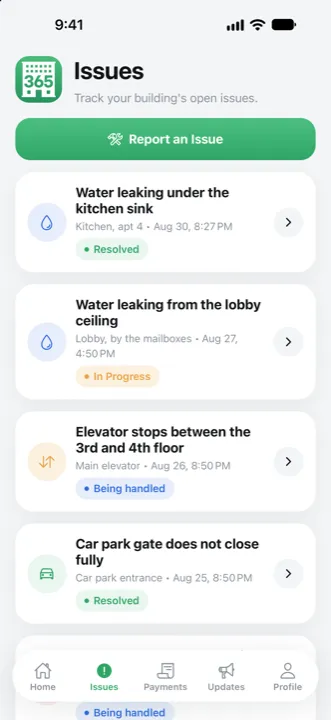
The list of open faults in a building
Three ways in

Code, QR or invite — whichever you were given

Building codes use an unambiguous alphabet, so nobody argues over an O and a zero. Prefer scanning? Point the camera at the poster in the entrance hall. Got an invite link from your manager? That works too.

  • Join codeShort, shareable, and tied to a single building.
  • QR posterScan it in the entrance hall and land on the right building.
  • Personal inviteManagers can invite a specific apartment directly.

Built for every side of the door

Residents get a calm, simple app. Managers get the tools to run a portfolio. Technicians get their jobs, and nothing else.
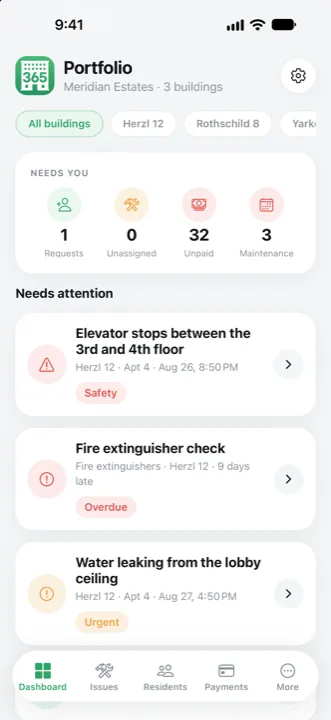
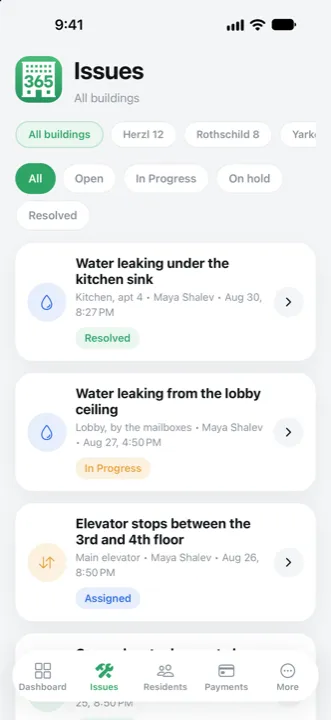
The manager portfolio dashboard
The cross-building faults board
Manager tools

The whole portfolio at a glance

Open faults, unassigned jobs, unpaid fees and maintenance coming due — across every building you run, or filtered down to one.

  • A worklist that sorts itselfWhat needs you today, first: unassigned jobs, missed visits, overdue maintenance and unpaid charges.
  • One building or all of themRun three buildings from one screen, then tap a chip to scope everything down to one of them.
  • Approve residents, keep the list cleanEvery join request arrives with the apartment and role attached. Approve or reject in a tap.
  • Announce it onceWrite an update and it reaches every resident in the building instantly.

For residents

Everything about where you live, without joining another group chat.

  • Report faults with a photo, a clip or your voice
  • Follow every fault to resolved
  • Read building updates in one feed
  • See what you owe and keep every payment confirmation
  • Switch between the buildings you belong to

For managers & committees

Run the buildings from your phone instead of a spreadsheet.

  • One worklist across the whole portfolio
  • Assign a technician and schedule the visit
  • Approve or reject join requests
  • Publish announcements to everyone
  • Track charges, payments and who has paid

For technicians

Your jobs, the address, and the two buttons you actually need.
  • Accept, reschedule or decline a job
  • Start work, or put it on hold with a reason
  • Photos before and after, in one place
  • Mark resolved and move on
  • Everything works with a weak signal
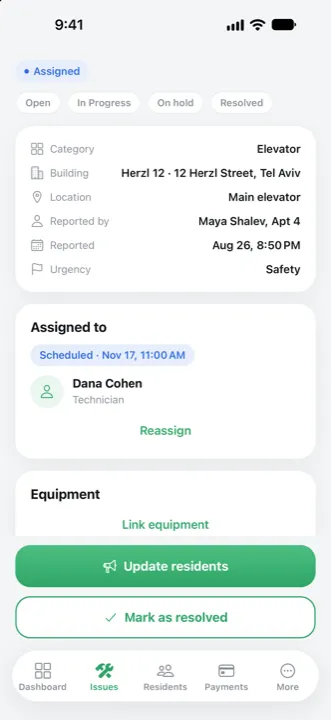
Assigning a technician and scheduling the visit
The preventive maintenance schedule
Dispatch & maintenance

Somebody is on it — and everyone can see who

Assign a fault to a technician by trade, pick a slot, and the job is theirs. They accept, reschedule or hold it with a reason, and the resident is told each time without anyone writing a message.

  • Assign by tradePlumbing, electrical, elevators — the list only offers technicians who do that kind of work.
  • A visit with a time on itSchedule the slot, and a missed visit shows up on the manager’s worklist by itself.
  • Held, not forgottenWaiting on a part? Put the job on hold with the reason. It stays open, and the resident knows why.
  • Preventive maintenanceRegister the elevator, the pump, the extinguishers. Each plan schedules its own next visit from the day the last one actually happened.

The small things, done right

The details that decide whether an app gets used in a real building on a real day.

Hebrew and English

The whole app, both languages, right-to-left where it should be — not a translated menu on an English app.

Works in the basement

Report a fault with no signal and it is sent the moment you have one. Nothing is typed twice.

Notified, not spammed

A fault you reported moving forward, a new announcement, a new building fee. That is the list.

More than one home

Own one flat and rent another? Both are in the app, and switching takes a tap.

Private by design

A building app knows where you live. We treat that with the seriousness it deserves.

Your building data stays yours

Every request is authenticated and scoped to the building you actually belong to. Nothing is sold, ever.

Locked down by default

The database is not reachable from the app at all. Every read and write goes through our API, which re-checks your membership on each call.

Leave whenever you like

Delete your account from the app and your personal data goes with it. No retention games.

Give your building one place to live

Download Building365, join with your building code, and see the difference by the next water shutdown.

Free for residentsNo adsYour data is never sold
The list of open faults in a building